Free AI LinkedIn Caption Generator [Create Effective LinkedIn Posts]
Discover how AI LinkedIn Caption Generators can revolutionize your content game! Use AI to create compelling captions, save time, and boost engagement on LinkedIn.
If you’re not leveraging AI right now, you’re sleeping on the future. We’re talking about a tool that does the heavy lifting for you. Imagine having a 24/7 copywriting assistant that’s always on point, always ready to help you craft killer LinkedIn captions that grab attention and drive engagement. That’s what an AI LinkedIn Caption Generator does.
Content is KING, but consistency is QUEEN, and they rule together. To keep up with the content game, you need to post regularly, but coming up with fresh, engaging LinkedIn Captions every day can be a grind. Enter the AI LinkedIn Caption Generator. This bad boy uses advanced algorithms to create compelling, relevant LinkedIn captions tailored to your style and audience. It takes the guesswork out of the equation and lets you focus on what really matters – connecting with your audience and building your brand.
Think about it: you’re a social media pro, you’ve got a million things on your plate – recruiting top talent, managing company culture, staying ahead of industry trends. The last thing you need is to spend hours brainstorming captions. Let AI handle that. It’s like having a superpower at your fingertips.
And the best part? The AI learns from your preferences and feedback. The more you use it, the better it gets at mimicking your voice and tone. It’s not just about saving time – it’s about amplifying your message and maximizing your impact.
So, if you’re serious about leveling up your LinkedIn game, start using an AI LinkedIn Caption Generator. Get those creative juices flowing without burning out. Remember, it’s all about working smarter, not harder.
Check out the video below to see this in action. Let’s get it!
Chapters
How to use an AI LinkedIn Caption Generator
Let’s fire up StoryLab.ai’s LinkedIn Caption Generator and see how it works.
After you’ve created your free account, choose the ‘Social Captions’ tool in the navigation.
Then, Select LinkedIn as the Social Platform.
Describe what your LinkedIn post is about, your target audience, your point of view and choose a writing style.
We used the following inputs:
- What your LinkedIn post is about: Create effective LinkedIn posts
- Target audience: Marketers
- Point of view: AI can help
- Writing style: Comedic
Here’s what the AI LinkedIn Caption Generator created for us:
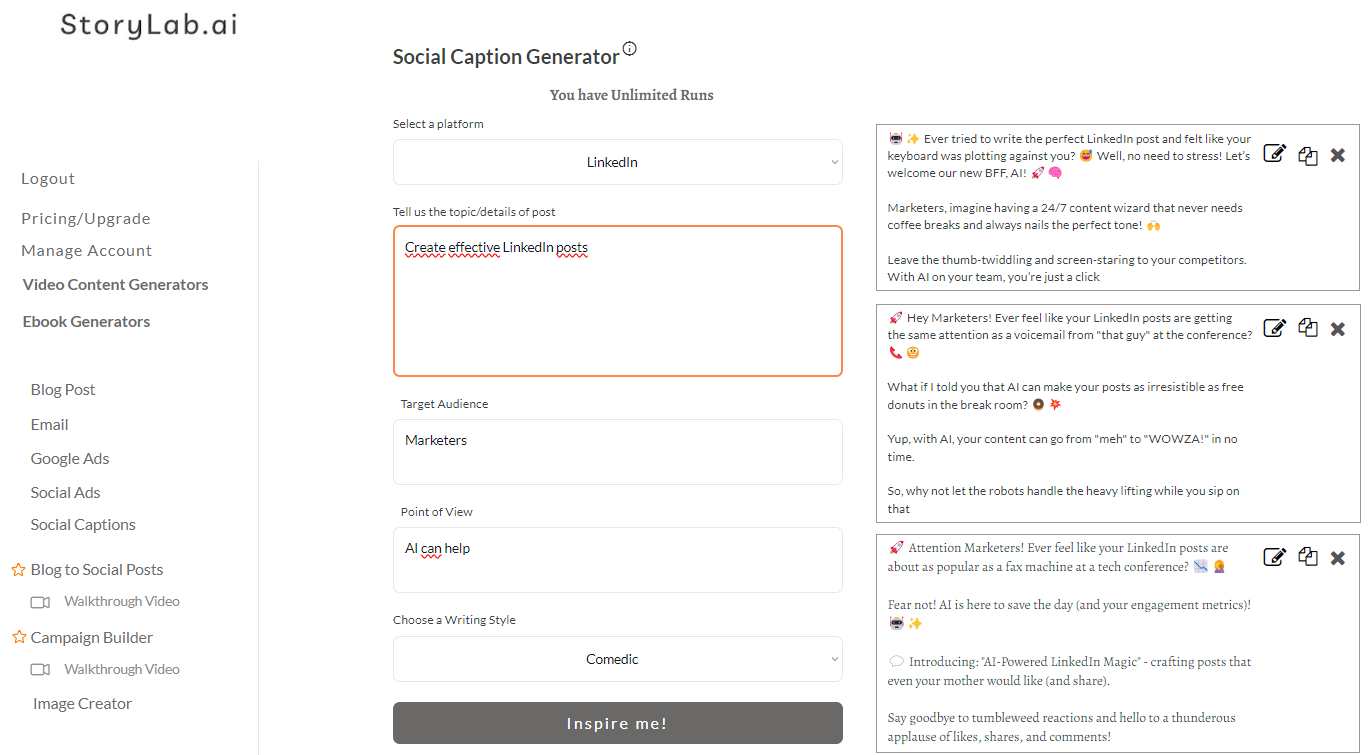
LinkedIn Caption Generator Outpus:
🤖✨ Ever tried to write the perfect LinkedIn post and felt like your keyboard was plotting against you? 😅 Well, no need to stress! Let’s welcome our new BFF, AI! 🚀🧠
Marketers, imagine having a 24/7 content wizard that never needs coffee breaks and always nails the perfect tone! 🙌
Leave the thumb-twiddling and screen-staring to your competitors. With AI on your team, you’re just a click
🚀 Hey Marketers! Ever feel like your LinkedIn posts are getting the same attention as a voicemail from “that guy” at the conference? 📞😬
What if I told you that AI can make your posts as irresistible as free donuts in the break room? 🍩💥
Yup, with AI, your content can go from “meh” to “WOWZA!” in no time.
So, why not let the robots handle the heavy lifting while you sip on that
🚀 Attention Marketers! Ever feel like your LinkedIn posts are about as popular as a fax machine at a tech conference? 📉🤦♀️
Fear not! AI is here to save the day (and your engagement metrics)! 🤖✨
💬 Introducing: “AI-Powered LinkedIn Magic” – crafting posts that even your mother would like (and share).
Say goodbye to tumbleweed reactions and hello to a thunderous applause of likes, shares, and comments!
Pretty cool, right? I can choose to re-run the caption generator or edit my inputs and get more LinkedIn post ideas.
The Benefits of an AI LinkedIn Caption Generator

If you’re not using an AI LinkedIn Caption Generator yet, you’re seriously missing out. Let’s break down the benefits.
1. Time-Saving Machine
Listen, time is your most valuable asset. As a Social Media pro, you’re already juggling a ton of responsibilities. The AI LinkedIn Caption Generator saves you HOURS by whipping up compelling captions in seconds. That’s right – more time for you to focus on what truly matters.
2. Consistency is Key
Content is king, but consistency is queen, and they rule together. You gotta show up regularly to stay relevant. The AI LinkedIn Caption Generator ensures you’re consistently putting out quality content without burning out. No more writer’s block, no more stress – just consistent, engaging posts.
3. Engaging and On-Point
Let’s be real, creating engaging content that resonates with your audience can be tough. This AI tool uses advanced algorithms to craft captions that are not only relevant but also attention-grabbing. It knows what works, and it’s gonna help you nail your messaging every single time.
4. Customizable to Your Voice
One of the coolest things about the AI LinkedIn Caption Generator is that it learns from you. The more you use it, the better it gets at mimicking your unique voice and tone. It’s like having a personal copywriter who understands your brand inside and out.
5. Boosts Engagement
Engagement is the name of the game on LinkedIn. More likes, comments, and shares mean more visibility for your posts. By consistently delivering high-quality content, you’re gonna see a significant boost in your engagement metrics. More engagement = more opportunities.
6. Stress-Free Content Creation
Content creation doesn’t have to be a grind. With the AI LinkedIn Caption Generator, you can enjoy the process. It takes the heavy lifting off your shoulders and lets you focus on building connections and growing your network.
7. Stay Ahead of the Curve
In the fast-paced world of social media, staying ahead of trends is crucial. AI tools are the future, and by adopting them now, you’re positioning yourself as a forward-thinking leader in the Social Media space. Be the trendsetter, not the follower.
So there you have it. The benefits of an AI LinkedIn Caption Generator are off the charts. It’s all about leveraging technology to work smarter, not harder. Save time, stay consistent, engage your audience, and boost your LinkedIn game to new heights. Let’s embrace the future together and crush it!
How to write a good LinkedIn caption with the help of AI

Here´s how to craft killer LinkedIn captions using the power of AI. If you’re serious about leveling up your LinkedIn game, you gotta pay attention. Let’s get into it!
1. Start with a Hook:
You gotta grab attention right out of the gate. Your first sentence needs to pull people in. Think about a powerful question, a bold statement, or a surprising fact. AI can help you brainstorm these hooks by analyzing what works best in your industry. Use it to get those creative juices flowing!
2. Keep It Real and Relatable:
People connect with authenticity. Share personal stories, insights, and experiences. AI tools can help you structure your thoughts and keep your tone consistent. But remember, the human touch is key – add your unique spin to whatever the AI suggests.
3. Add Value:
Always bring value to your audience. Whether it’s a tip, a lesson learned, or industry insights, make sure your post offers something useful. AI can help generate ideas and outline points, but you gotta ensure it’s packed with value that resonates with your audience.
4. Use Engaging Language:
Boring content gets ignored. Use dynamic, engaging language to keep people interested. AI tools can suggest synonyms, catchy phrases, and compelling words to spice up your captions. Don’t be afraid to play around with it until it feels right.
5. Call to Action (CTA):
End your caption with a strong CTA. Whether you want people to comment, share, or check out your latest blog post, make it clear and compelling. AI can generate CTA ideas tailored to your goals, making sure you drive the desired action.
6. Keep It Concise:
People scroll fast. Make your captions punchy and to the point. AI can help you trim the fat and get to the essence of your message. Brevity is key – say what you need to say without dragging it out.
7. Analyze and Iterate:
One of the biggest advantages of using AI is the ability to analyze performance. Look at what captions perform best, and let the AI suggest improvements. It’s all about iterating and refining your approach based on data.
8. Stay Consistent:
Consistency is everything. Regular posting keeps you top of mind with your audience. Use AI tools to plan and schedule your content, ensuring you maintain a steady presence on LinkedIn.
So there you have it. Writing a good LinkedIn caption with the help of AI is all about leveraging technology to enhance your creativity and efficiency.
Start with a strong hook, keep it real, add value, use engaging language, and always include a CTA. Analyze, iterate, and stay consistent.
Let AI be your secret weapon, but remember – it’s your unique voice and authenticity that will truly resonate.
Conclusion
There you have it. The AI LinkedIn Caption Generator – your new best friend in the content game. It’s all about working smarter, not harder. Leverage this tool to free up your time, stay consistent, and keep your audience hooked.
Check out the Best AI LinkedIn Caption Generators and start your free trial.
Valuable Resources
LinkedIn Caption Generator
Start with a Free LinkedIn Caption Generator
LinkedIn Marketing Travel
LinkedIn Post Generator
Start with a Free LinkedIn Post Generator